From Hum to Demo - The Full Life of a Song in LandChords
Every song starts the same way: something catches. A chord shape under your fingers. A melody you can't stop humming. A line that feels like it already knows where it's going. The problem has never been the spark - it's everything that happens next.
You open a notes app to catch the lyric, a tuner app to figure out the chord, a voice memo to record the melody, and by the time you have three tabs open the moment is gone. Or you lose it entirely because you were driving.
This is the problem LandChords is designed to solve. Not by doing the writing for you, but by making sure nothing gets lost and everything stays in one place. Here is what a song looks like when you build it all the way through.
Stage 1: Catching the idea
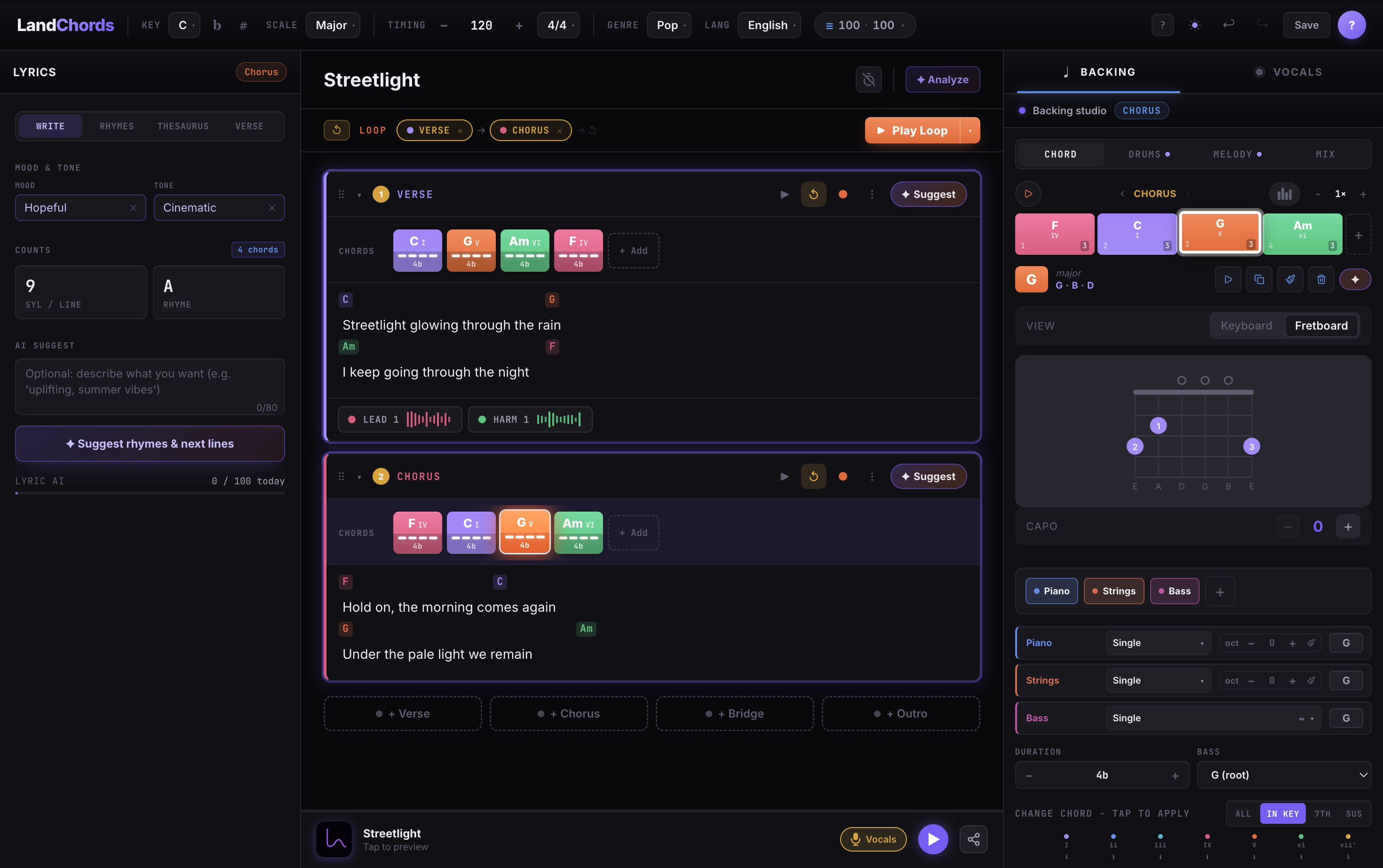
The fastest thing you can do in LandChords is open a new song and start pressing chord buttons. You don't need a title. You don't need to know the key yet. Pick a root note that sounds roughly right, tap the degree that matches what you heard, and it's saved.
The goal in this stage is not to have a good song. The goal is to have something on the page instead of nothing.
If you caught a chord on the guitar or piano, use the Chord Maker → Try it to find the matching degree. Because chords are stored as Roman numerals rather than fixed letter names, you can figure out the key later and everything will follow. A progression you caught in the wrong key is one click from the right one.
Stage 2: Building the structure
Once you have a verse idea down, resist the urge to loop it forever. A song needs sections: verse, chorus, bridge, maybe a pre-chorus or an outro. In LandChords each section gets its own chord progression and its own lyric block, so the whole structure of the song lives in one vertical scroll rather than scattered across documents.
Build a chorus that contrasts with the verse. If the verse sits on a minor vi–IV loop, try landing the chorus on the I - the major home chord - to make it open up. If the verse is busy, strip the chorus back. If the verse is gentle, let the chorus push.
The Transpose → Try it feature earns its keep at this stage. When you want to try the whole song a tone higher to sit better in your voice, it takes one click and every section updates.
Stage 3: Laying down a pulse
A chord progression floating in silence is hard to write lyrics to. Before you touch the lyric editor, give the song a heartbeat.
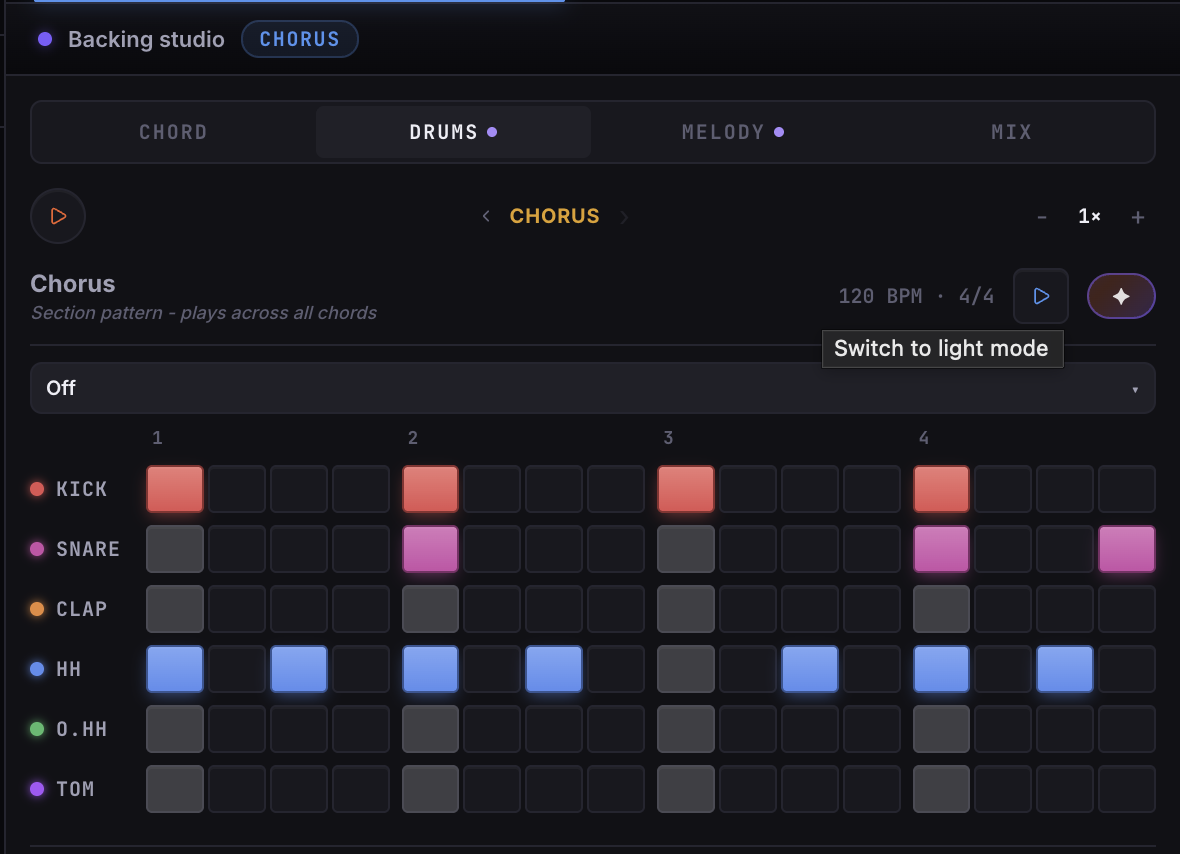
Turn on the drum machine and program the simplest possible beat: kick on 1 and 3, snare on 2 and 4, hi-hats running eighth notes. Don't overthink it - this is scaffolding, not the final arrangement. The Drum Machine → Try it locks to the song's BPM and time signature, so when you hit play in the chord section the beat is already in time.
With a pulse running you can hear whether the progression is actually working. Two chords that sounded interesting in isolation might feel wrong at tempo. You'll know immediately. Adjust now, before you've written twenty lines of lyrics to a progression that needs to change.
Stage 4: Writing the lyrics
Open the lyric editor in the section you want to write first - usually the chorus, because writing to the most important part first gives the verses something to build toward.
Write badly on purpose. A placeholder lyric that scans correctly is worth more than a blank line waiting for the perfect word.
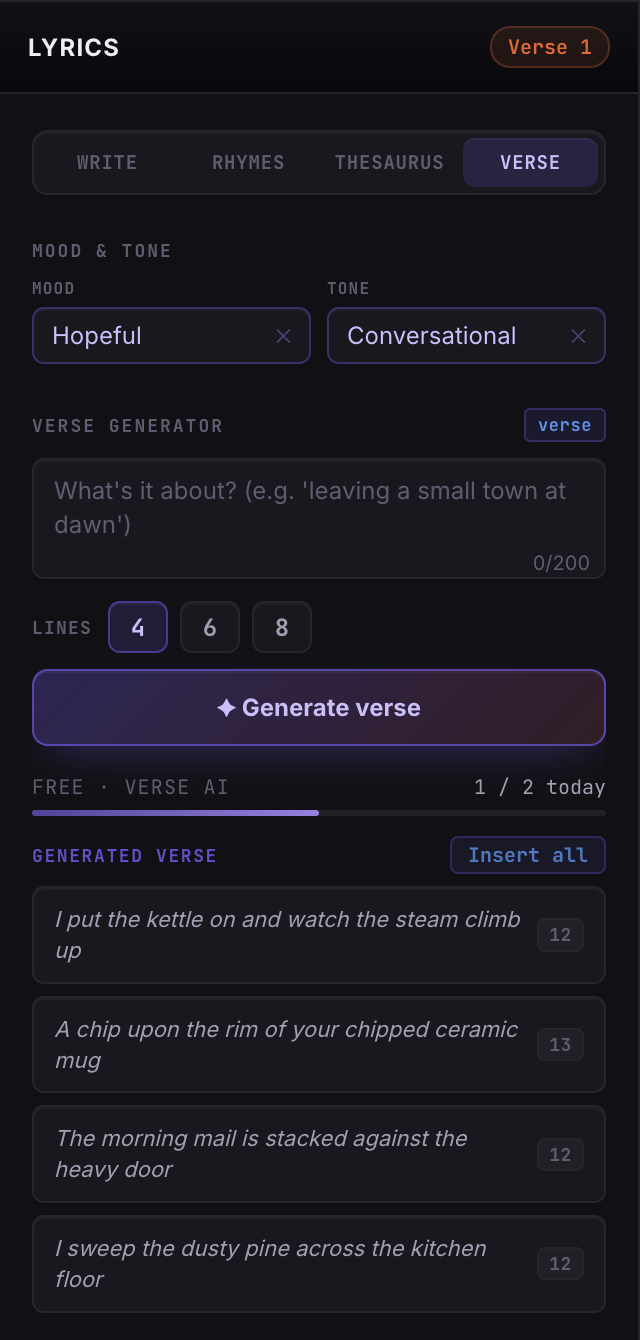
The Lyric Lab → Try it has a rhyme finder and thesaurus built in. Use them freely in this stage, but don't stop to perfect individual lines. Get the whole section filled with something that has the right number of syllables and roughly the right feeling. You can replace every word later. You cannot rewrite what isn't there.
Once a line starts to feel right, pin the important words to chord changes. Tap the word where the chord lands and it anchors there - so when you eventually record, the phrasing follows your actual meter instead of drifting.
Working in a language other than English? The AI tools in the Lyric Lab work across 12 languages, including rhyme suggestions and the verse generator.
Stage 5: The scratch vocal
As soon as you have a verse and a chorus with real (if rough) lyrics, record a scratch vocal. Not a finished take - just proof that the melody exists and fits the words.
In the Vocal Studio → Try it, set the verse section to loop, grant mic permission, and hit record. Sing it the way you'd sing it in your head. If you stumble on a line, keep going - you're not editing this take, you're just capturing the shape of the song.
Listen back once. You'll immediately hear three things:
- Where the melody actually wants to go versus where you assumed it would
- Which lyric lines are awkward when sung at tempo
- Whether the key fits your voice
That last one matters most. If you're straining on the chorus, use the transpose feature to move everything down a half step. Your scratch vocal comes with the song automatically - you don't have to re-record anything to check a new key.
Stage 6: Rewriting with something to rewrite
This is the stage most songs never reach, because this is the stage that requires the song to already exist in some form. With a scratch vocal, a chord progression, and a first-pass lyric, you have a target to aim at.
Go back to the Lyric Lab. Use the rhyme finder to find better rhymes than the placeholders. Read each line out loud and count the syllables - the syllable counter shows you where lines are over- or under-filled. If a whole section feels wrong, ask the AI verse generator for alternatives based on the theme and mood. Take what's useful, ignore the rest.
The thing the AI is actually good for is unsticking you. A stuck line is just a line you've looked at too long. Sometimes seeing five generated alternatives - even bad ones - breaks the logjam.
Stage 7: Stacking the demo
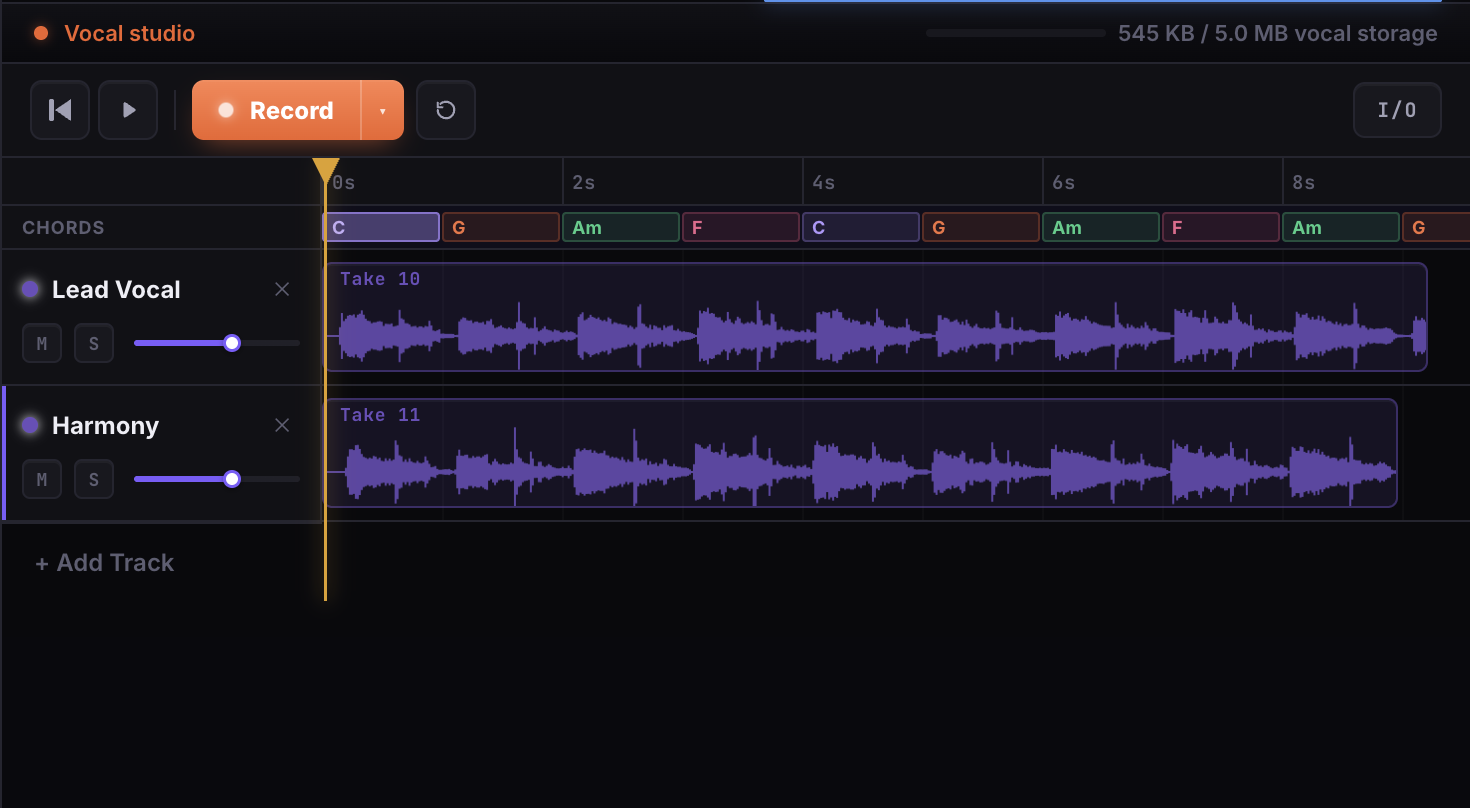
Once the lyrics are close to right, record proper takes. In the Vocal Studio you can stack layers: record the lead on one layer, come back and add a harmony on a second, maybe a doubling on a third. Each layer can be muted or soloed independently.
You don't have to record everything in one session. This is the point. Every take is saved to the cloud and attached to the song. Open LandChords tomorrow on a different device and the same song is there, exactly where you left it, with all the takes intact.
When you're done, bake the tracks down to a backing stem and export to WAV on Pro. You'll have a demo you can send to a collaborator, a producer, or just keep as a reference for how the song sounded at this point in its life.
Stage 8: Getting a second opinion
When you're too close to a song to hear it clearly, run the AI song analysis. It reads your full song - sections, chords, and lyrics together - and gives you notes on structure, harmony, and where the words could land harder.
The notes it returns are specific to your song, not a generic checklist. It might notice that your pre-chorus is harmonically identical to the verse and suggest a way to differentiate them. It might flag that a lyric line has a strong image in one place and a weak one in the next. Take what's useful. Ignore the rest.
AI Song Analysis → Try it is a Pro feature. The other AI tools - chord suggestions, lyric helper, verse generator, autocomplete - are available free with a daily taste.
Stage 9: The song as an artefact
When you close the tab, the song doesn't disappear. It's in your library with its title, key, BPM, sections, lyrics, chord progressions, and every vocal take. Open it a week later and you're exactly where you left off.
This is what it means for a tool to respect the work. Ideas take time to become songs. Most of them go through phases where they look unfinished for months before suddenly snapping into place. The right infrastructure doesn't rush that - it just makes sure nothing goes missing while you're waiting.
Start free. Come back when the idea hits.