How to Use a Chord Progression Generator Without Writing a Generic Song
A chord progression generator will hand you four chords that work. That's exactly the problem: they work the way a stock photo works. The skill isn't in generating the progression — it's in what you do to it afterwards.
Here's a process that keeps the speed of a generator and still ends in a song that sounds like yours. If you want something to follow along with, our free chord progression generator runs in the browser with no account needed.
1. Generate to escape the blank page, not to finish
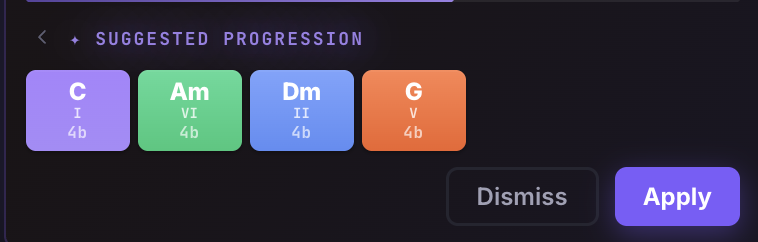
Use the generator for the first thirty seconds of a song's life. You want any harmonic floor under your feet so you can start humming. In the LandChords Chord Maker → Try it, you ask the AI for a progression in your key and genre and it drops real, editable chords into your song — not a printout you have to copy somewhere else.
2. Read what it gave you
Before changing anything, understand the shape. Degree-based display helps here: seeing I–V–vi–IV instead of "C–G–Am–F" tells you the function of each chord, which is what you'll be editing. (If those numerals are new to you, our music theory for songwriters guide covers them in ten minutes.)
3. Change exactly one chord
Generated progressions are diatonic and safe. The fastest way to own one is a single substitution:
- Swap the IV for a iv (minor four) and the progression suddenly has an ache in it.
- Replace the V with a bVII for an instant indie-rock lean.
- Trade the vi for a III if you want drama.
One outside chord is a signature; three is a mess. The colour-coded degrees in the chord maker make the outsider visible at a glance.
4. Break the rhythm, not just the chords
Generators output one chord per bar like a metronome. Real songs don't. Give the third chord two extra beats. Cut the last one short. In LandChords each chord has its own beat count, so the progression's rhythm is as editable as its notes — and you can audition it instantly with Chord Maker → Try it.
5. Write before you re-generate
The trap with any generator is the slot machine loop: re-roll, re-roll, re-roll. After one edit pass, force yourself to write a melody or a line of lyric over what you have. A progression only reveals whether it works when there are words on top of it — which is why the chord maker, the Lyric Lab → Try it, and the Vocal Studio → Try it share one page here.
The short version
Generate to start, edit one chord, bend the rhythm, then sing on it. The generator is a writing partner with infinite patience and zero taste — the taste is your job.
Start free and try the generate-then-edit loop on a real song.