How to Share a Song Demo as a Public Link
A finished demo is worth nothing if it stays on your hard drive. Sending a file means the other person has to find an app to open it. Sharing a link means they tap it and it plays. The difference in how often people actually listen is significant.
What the listener hears
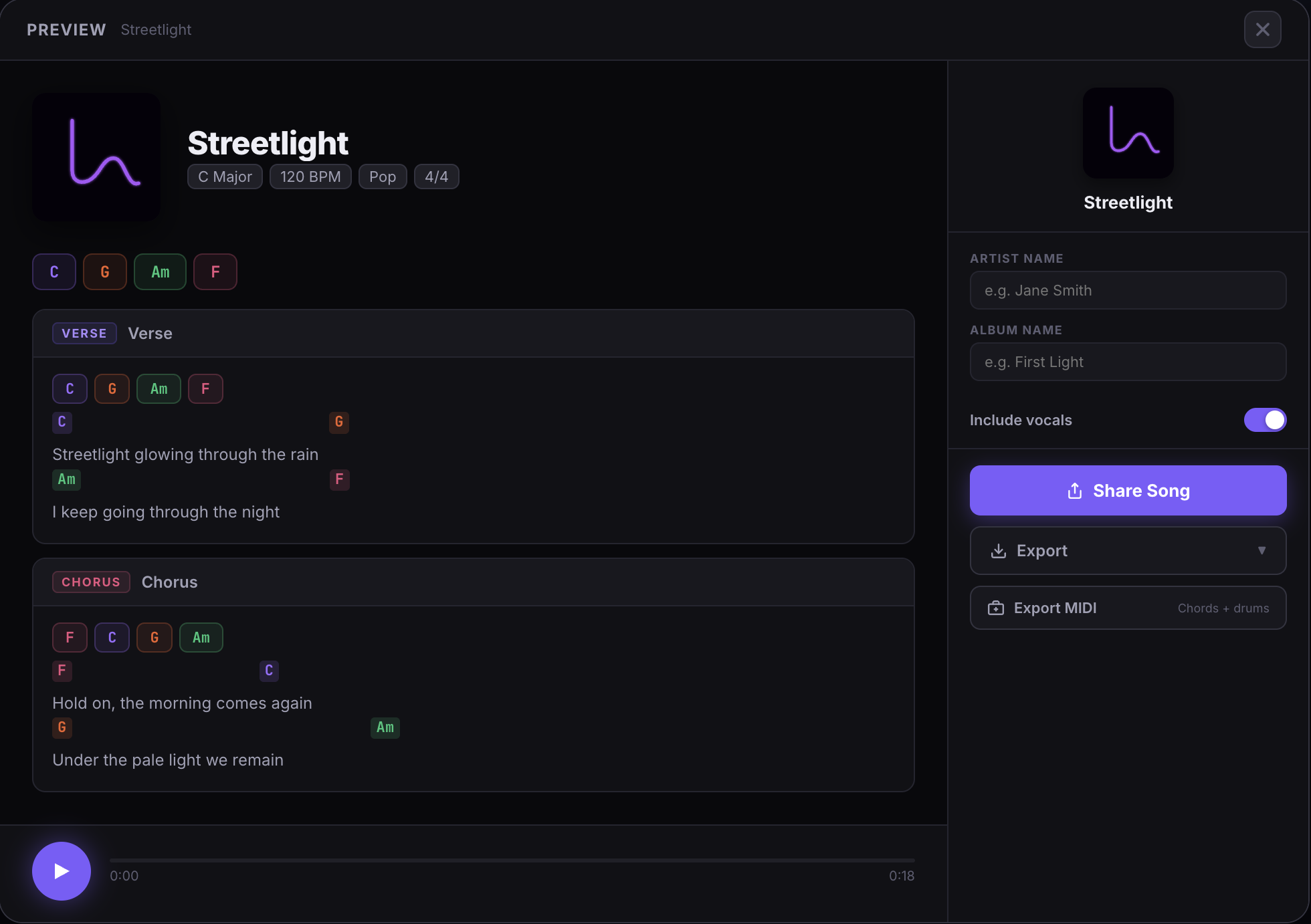
When you share a preview link, the listener gets a clean playback page in their browser. It plays your backing track and your vocal takes mixed together as a single stream. They hear the chords, the drums, and the vocals in one pass, exactly as you had them balanced in the studio.
No account. No app. No download. The link works on any device with a browser.
Before you share: add your artist info
The preview page shows a cover, your artist name, and the song title. Before you generate the link, spend thirty seconds filling those in.
- Song title — already set from the editor, but double-check the spelling
- Artist name — your name or your project name
- Album — optional, but useful if you are sharing multiple songs from the same project
- Cover art — use one of the auto-generated color covers, or upload your own image
A preview page with a real cover and artist name looks intentional. A preview page with default placeholders looks like a rough draft, even if the music is good.
Generating the link
Hit the Preview button from the song editor. The preview page opens with a shareable URL in the address bar. Copy it and send it wherever you need to: a text message, an email, a voice note with context.
The link is persistent. It will keep working as your song saves. If you make changes to the mix after sharing, the listener will hear the updated version the next time they open the link.
Who is this for
The preview link is most useful for three situations:
Getting feedback from a collaborator. A producer or co-writer can hear the current version of the song immediately, without you sending files or scheduling a session. They can listen on their phone on the way to work.
Sharing with a band or session musicians. Everyone can hear the reference demo before rehearsal. The chord changes, the tempo, the arrangement are all there. No confusion about which version is current.
Sharing on social or in a bio. The link is clean enough to put in an Instagram bio or a direct message. It is not a streaming link, but for an unsigned songwriter sharing demos it works well.
WAV export for higher-quality shares
The preview link plays a mixed stream. For situations where you need a file — a submission, a sync pitch, a producer who wants stems — WAV export on Pro bounces your layers to a full-quality audio file in the browser, no extra software needed.
Write the song, record the demo, then hit Preview and send the link. The whole thing lives in one tab from the first chord to the shared link.
Start free and share your first demo today.