How to Program a Drum Beat for Your Song in the Browser
A song without a beat is hard to sing over. The tempo lives in your head, but the moment you try to record, it drifts. If you do not know the BPM of the idea you are humming, a free tap tempo tool will find it in a few taps. A simple kick-snare pattern changes that. It gives you a pulse that holds time, and once you have a pulse, every other part of the demo gets easier to record.
You do not need a drum kit, drum samples, or a separate DAW. A 16-step sequencer in the browser is enough.
What a 16-step drum machine does
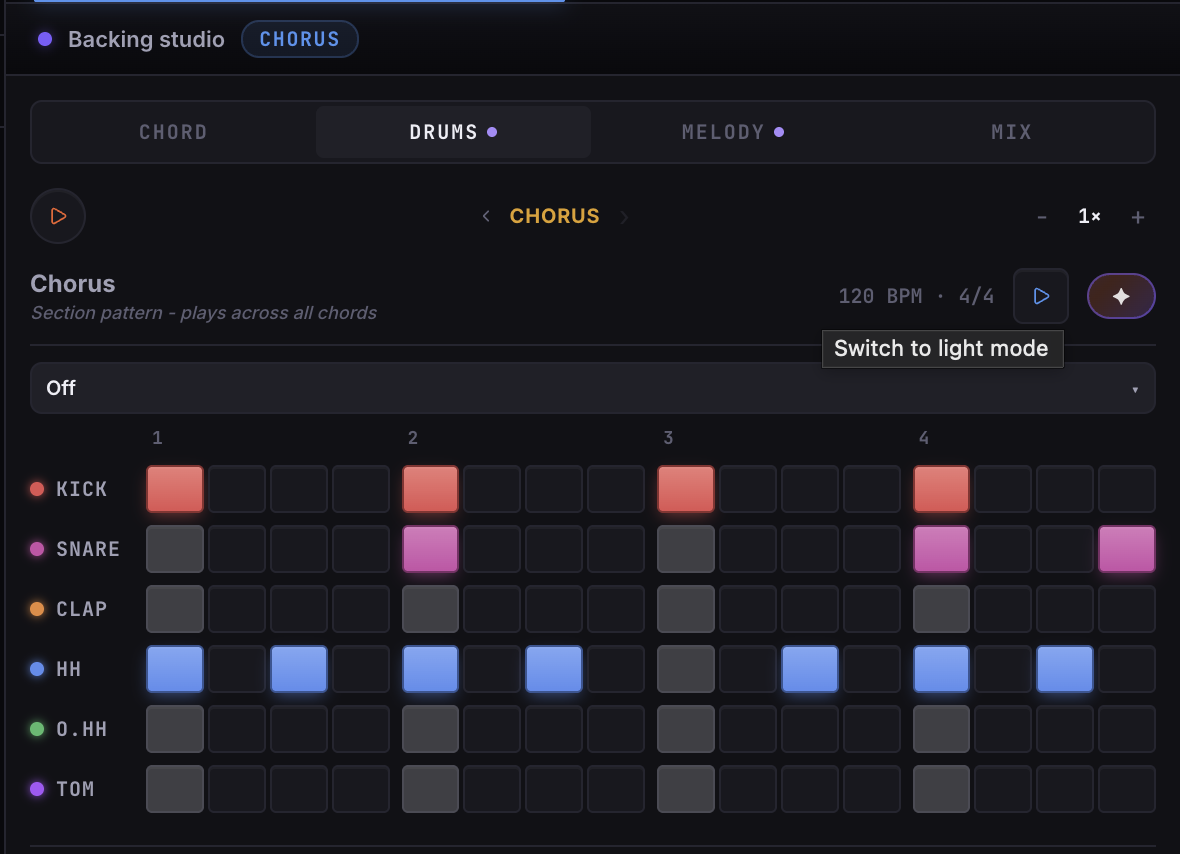
A 16-step sequencer divides one bar into 16 slots — one for each sixteenth note. You switch slots on or off for each drum part. When you hit play, the pattern repeats in a loop at your song's tempo.
The most common setup has three rows:
- Kick — the bass drum, typically on beats 1 and 3
- Snare — the snare, typically on beats 2 and 4
- Hi-hat — the steady pulse on every eighth or sixteenth note
That three-part pattern is enough to make a demo feel like a real song rather than a raw idea.
Start with kick and snare
Before you add anything else, lock down kick and snare. In a four-beat bar:
- Kick on steps 1 and 9 (beats 1 and 3)
- Snare on steps 5 and 13 (beats 2 and 4)
Play your chord progression over this. Even at its most basic, that heartbeat feel is enough to keep time and give you something to sing against.
Once the kick and snare feel right, add a hi-hat on every even step (2, 4, 6, 8...) for a steady eighth-note pulse. That is your full basic groove.
Vary it by section
A pattern that does not change across the whole song gets monotonous. The simplest variation is to change the hi-hat density between verse and chorus:
- Verse — eighth-note hi-hat (every other step), lighter feel
- Chorus — sixteenth-note hi-hat (every step), more driving energy
That single change makes the chorus feel like it opens up, even if the kick and snare stay the same.
Save the pattern
Once you have a pattern you like, save it. You can store multiple patterns, one per section, and recall them later. That way your verse groove and chorus groove stay separate and are easy to tweak independently.
Bake it into a backing track
The drum pattern plays in sync with your tempo, but to sing over it you need to bake it down. Combine the drums with your chord progression into a backing track, then loop a section in the Vocal Studio → Try it and record. Your vocal takes will land on the grid automatically.
Baking is non-destructive. Your pattern is still there to edit after. If you decide the kick is in the wrong place, change it, re-bake, and record again.
Keep it simple
The goal at the demo stage is not a great drum arrangement. It is a reliable pulse. A four-bar loop of kick, snare, and hi-hat that holds time is worth more than a complex pattern that distracts you from writing the song.
Get a beat down, bake it, sing over it. You can replace it with a real performance or a produced drum track later. Right now, you just need something to sing to.
Ready to try it? Open the drum machine in the LandChords editor, program a basic groove, and bake it before your next recording session.